In the previous article, in SAP Business One You can see The Last Price from Inventory Menu → Inventory Reports → Last Prices Report.
Did you know, SAP Business One also provides a Shortcut to see the Last Price?
When You create a Sales Order/Purchase Order, and but you are in doubt and want to confirm the Last Price. Don’t worry you don’t need to change screens.
SAP Business One provides a Short cut to all Marketing Documents in SAP. You only need to press the button Ctrl+Tab on your keyboard in Unit Price Column.
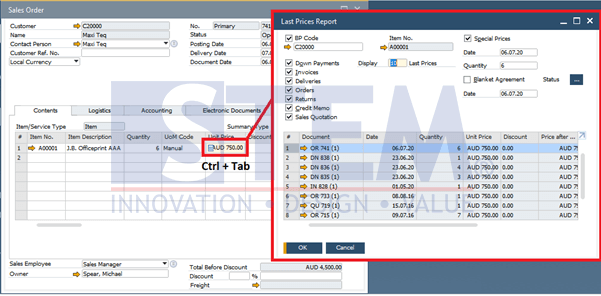
SAP Business One Tips – Shortcut to See Last Price
The Last Price Report from the item will appear. It’s easy, right? After seeing the Last Price, you can continue creating a Sales Order/Purchase Order.
Also read relevant SAP Business One Tips:
- Using the Last Price Report in SAP Business One
- How to Print SAP Business One Documents Automatically
- How to Auto-Generate Warehouse Sublevels in SAP Business One
- SAP Business One 10 Document Printing Enhancements
- Monitor Last Purchase & Selling Price in SAP Business One
- New Features in SAP Business One 10 – Admin, Sales, Purchasing