When purchasing goods through a vendor, customers might receive a defective item or might receive an item that was damaged as a result of delivery. In SAP Business One, it is possible for vendors to resend the goods they have sold to customers. This is an effort to increase customer satisfaction with the services provided by vendors. To activate Redelivery Setting from the Base Document, the user must:

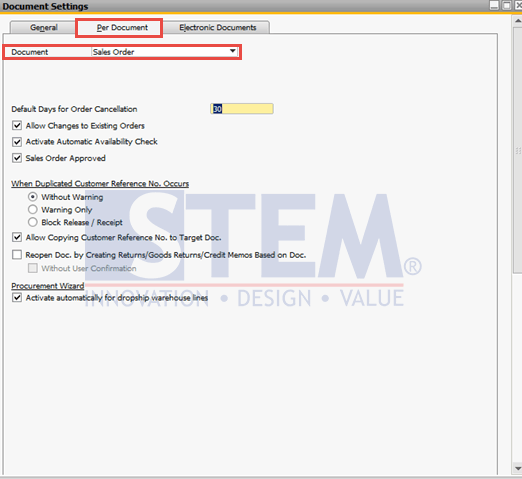
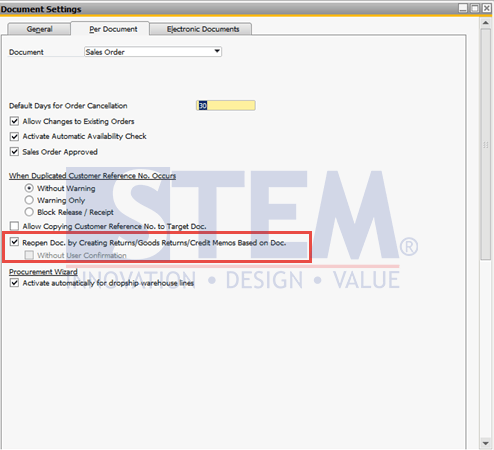
- In SAP Business One, select the Administration Menu > System Initialization > Document Settings, or in the search menu, type Document Settings.
- Choose Per Document tab
- In the Document field, choose the Sales Order
SAP Business One Tips – Redelivery Setting from the Base Document
- Check on Reopen Doc. by creating Returns/Goods Returns/Credit Memos Based on Doc.
SAP Business One Tips – Redelivery Setting from the Base Document
- Click Update
In this way, when we create a returning document such as Returns/Good Returns/Credit Memo, the Sales Order will re-open again so we can do delivery base on Sales Order.
Also read relevant SAP Business One Tips:
- SAP B1: How to Display Canceled & Cancellation Watermarks
- Freight Settings in SAP Business One ERP Guide
- Landed Cost vs In-Stock Qty: Causes & Fixes
- Limit Document Cancellation by Age in SAP Business One
- Duplicate SAP Business One Item Master Data Quickly
- Currency Disabled in SAP B1 Payment Means – Fix Tips