
Every business transaction will be related to a Journal Entry. Journal Entry is usually very simple, consisting of only two or three words, making it easier for us to know what a Journal Entry is about.
However, what if there is a case where Journal Entry is very complicated and makes it difficult for us to know directly about the contents of this journal?
To help us adding more detailed information for Journal Entry, SAP Business One extended the Journal Remarks field in Journal Entry and the Journal Remark field in marketing documents to 254 characters.
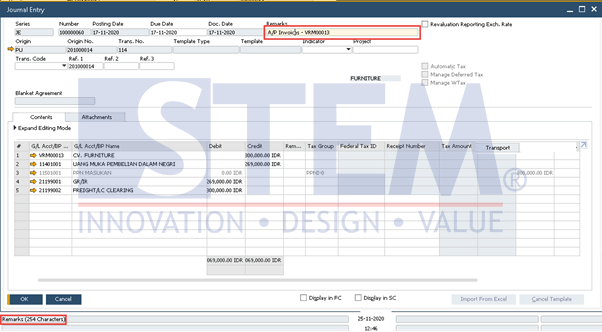
SAP Business One Tips – Number of Journal Remarks Character Extended
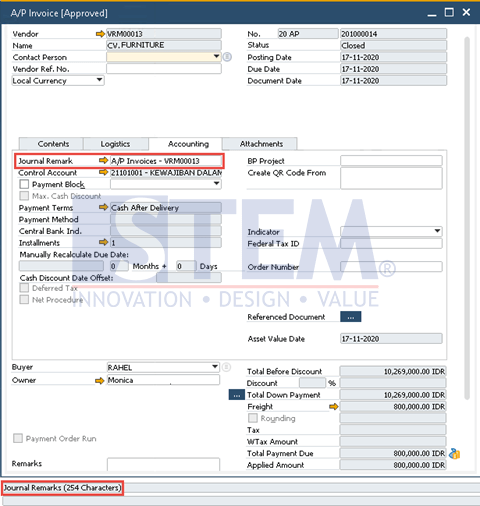
SAP Business One Tips – Number of Journal Remarks Character Extended
*Note: Available on SAP Business One 10.0 and SAP Business One 10.0, version for SAP HANA.
Also read relevant SAP Business One Tips:
- Fix “G/L Account Needs DR Assignment” Error in SAP B1
- Credit Memo Without Affecting Inventory in SAP B1
- How to Create Down Payment in SAP Business One
- SAP Business One Chart of Accounts Account Types
- Fix Recurring Posting Failed to Create Journal Entry
- Set Cash Limit per User on Incoming Payments in SAP B1