Do you know, that in SAP Business One, there are many informations that we can access easily? Even if you are looking for a list of all deliveries to a customer that has not been invoiced.
You can directly access the information by following these steps :
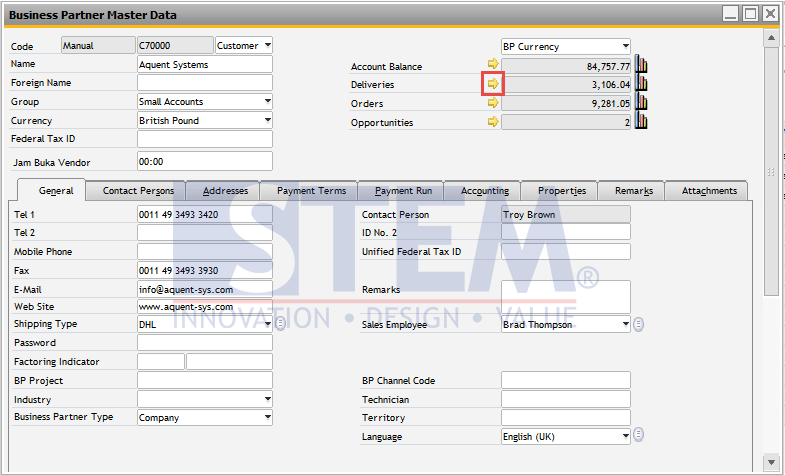
- Go to “Business Partner Master Data”
- Look for the Customer that you want to get the list of un-invoiced delivery.
- Click on the Golden Arrow next to the Deliveries field. The value inside the field is the amount of total un-invoiced deliveries.
SAP Business One Tips – How To See the List of Delivery per Customer That Has Not Been Invoiced
- When you click the Golden Arrow, the system will show the list of deliveries that have not been invoiced.
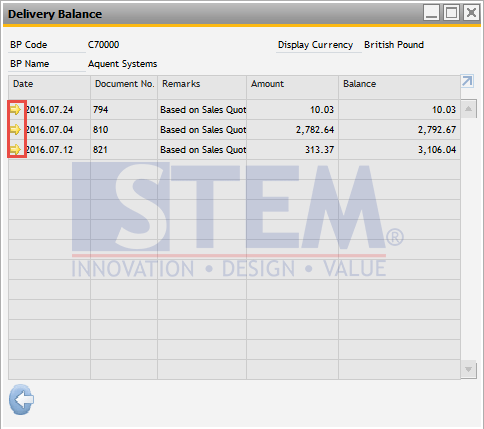
SAP Business One Tips – How To See the List of Delivery per Customer That Has Not Been Invoiced
- You can click again in the Golden Arrow in each document to see the detail. You can also directly do “Copy To” AR Invoice if you want to create the invoice.
Also read relevant SAP Business One Tips:
- How to Set User Authorization to View Discount Price in SAP B1
- How to Check Item Stock Availability in SAP Business One
- How to Configure SBO Mailer in SAP B1 – Step-by-Step
- How to Set Authorization for Duplicating Documents in SAP Business One
- Running SSR Manual Upload in SAP Business One
- Add Warehouse Details to SAP B1 Sales Order (Step-by-Step)