SAP Business One is designed to be able to suit all types of company business. For example, we usually place revenue accounts from businesses as Sales Accounts, but some companies put income accounts outside of Sales Accounts for several reasons. To solve this problem, SAP allows us to choose account types that can be adjusted as income accounts. The trick is:
- In the SAP Business One main menu, go to Administration menu > System Initialization > Company Details.
- In the Company Details window, go to the Basic Initialization tab
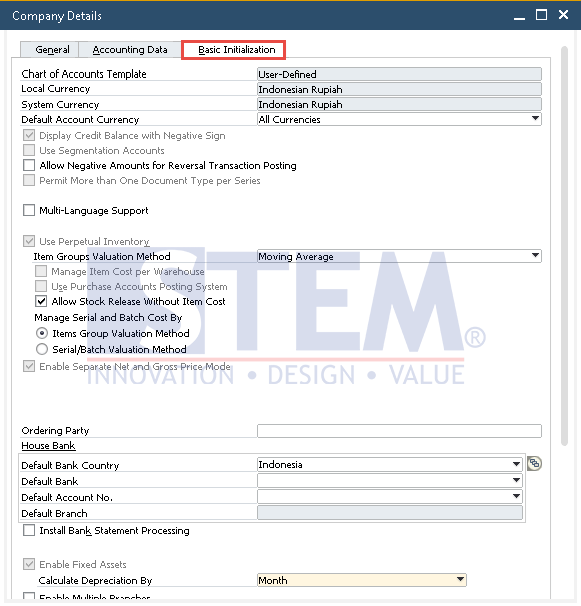
SAP Business One Tips – Eliminating Restriction When Setting Revenue Account
- Scroll to the bottom and checked the option Allow Selection of Any Account Type for Revenue Account.
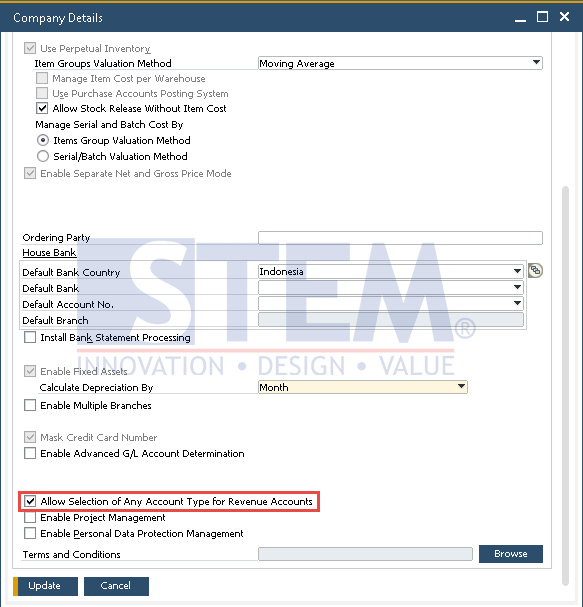
SAP Business One Tips – Eliminating Restriction When Setting Revenue Account
- Click

- After that, go to Administration > Setup > Financials > G/L Account Determination > Purchasing Tab.
- In this example, I can use Sales Revenue Account in the Purchasing tab
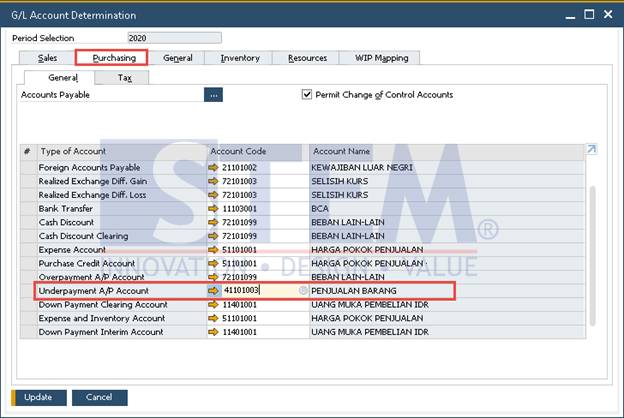
SAP Business One Tips – Eliminating Restriction When Setting Revenue Account