





It is important to Lock the SAP Business One when we’re out of office or going for a while, because the other user can use or input SAP Business One under your user Account when your left your PC or Laptop. This is very useful if you’re using terminal server for SAP Business One Client.
To Lock Screen, simply on Main Screen – Click Lock Screen. And then your SAP Business One Login will appear.
Only your User ID password can Login again to SAP Business One Client.

Change Password
You can change your user password frequently as you want to prevent other user use your ID for security purpose.
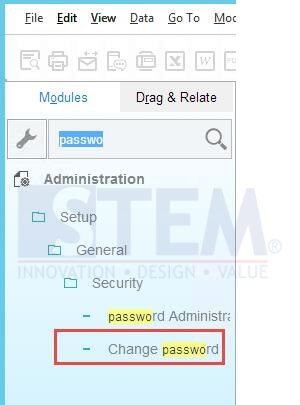
Simply Go To Administration > Setup > General > Security > Change Password
Copyright © PT Sterling Tulus Cemerlang – 2017
Also read relevant SAP Business One Tips:
- Block Duplicate Cust. Reference No. in SAP B1
- Automate Closing Period in SAP Business One
- Allow Journal Entry Update in Locked Posting Period
- How to Depreciate Assets in SAP Business One – Quick Guide
- Fix Invalid Currency Error in SAP Business One Journal Entry
- How to Change Date Format in SAP Business One









