If your company is applying ‘Budget’ for operational activities, you can easily create and monitor it with SAP Business One.
You can have Budget per cost center by defining it on your budget scenario.
- From the SAP Business One Main Menu, choose Financials → Budget Setup → Budget Scenarios. The scenarios assigned to the selected fiscal year are displayed
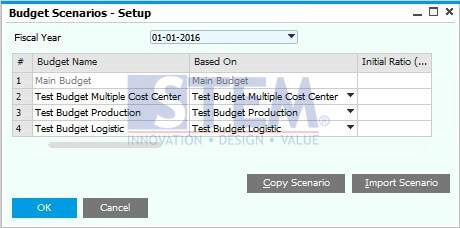
- Go to “Budget”

- Input amount on your selected account, and make sure you already choose the right Dimension.
On default set, there will be show on “Distr. Rule Code” field only “OTHERD”.
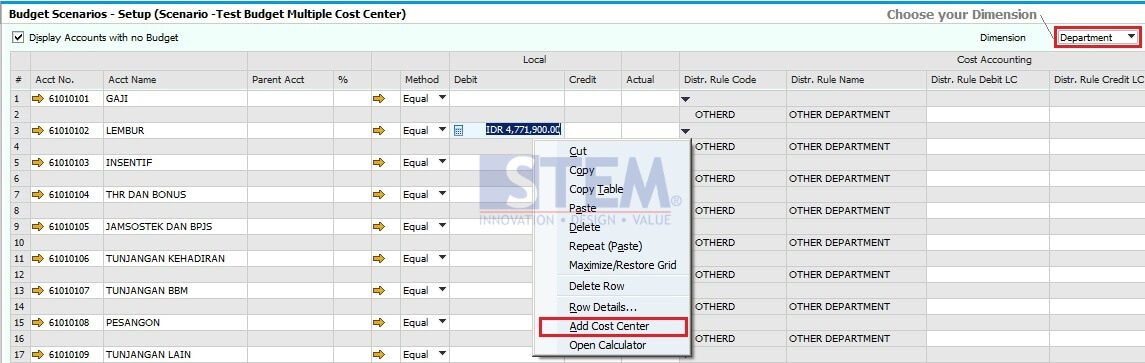
- Then, choose Add Cost Center, screen List of Distribution Rules will be shown.
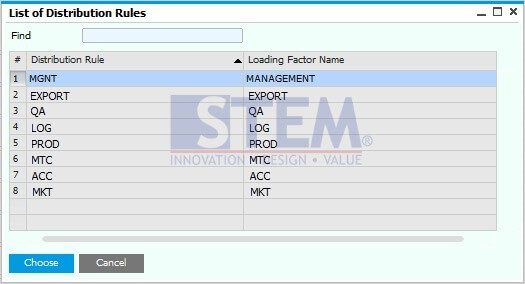
- Choose Cost Center as you want, and then input amount for selected Distr. Rule

After finish, click Update
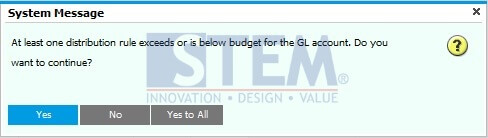
- Sometimes after you click Update, there will be notification like this
Just click Yes, and your budget setting will be generated on system for specific distribution rule.
Also read relevant SAP Business One Tips:
- How to Create Down Payment in SAP Business One
- Decimal Display Format in SAP Business One – Customize Numeric Precision
- SAP B1 Budget Distribution Methods Explained
- How to Set SAP Business One Control Account – Guide
- How to Split & Merge Distribution Rule in SAP Business One
- Set Cash Limit per User on Incoming Payments in SAP B1