





In SAP Business One, we can create some queries for simple reporting. And to easily access the queries, we can put them in the left menu window.
This is how to set them up for easy access :
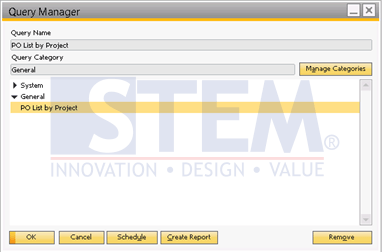
- Open Query Manager, and select a query
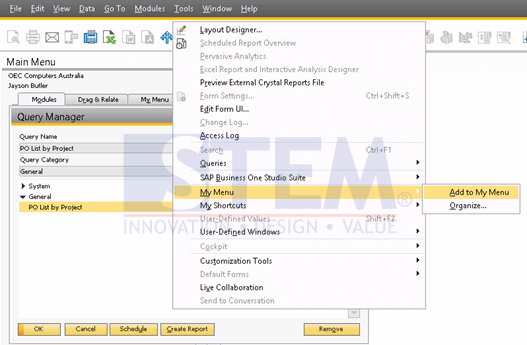
- Then go to Tools – My Menu – Add to My Menu
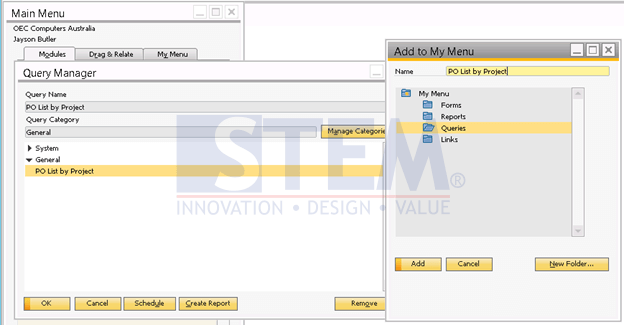
- Select a folder, then choose Add. If you want to put your queries access in a new folder, you can first create the folder by clicking “New Folder“.
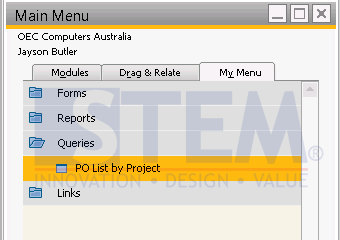
- You can see that the query is now under the My Menu – Queries.
Also read relevant SAP Business One Tips:
- How to Set User Query to SAP Business One Main Menu
- How to Give User Query Permissions in SAP Business One
- Authorization for Custom Crystal Reports in SAP B1
- How to Set SAP Business One Control Account – Guide
- Create & Update Parameters in SAP Crystal Reports
- How to Depreciate Assets in SAP Business One – Quick Guide









