Tips SAP Indonesia – As we know, SAP Business One provide a feature / facilities to make us easier retrieving data from the system using queries to database.
In this example, we want to make a report to show the Top 5 Items that are most profitable for the company based on sales made in a certain period.
Below is one of the example to show List of Top 5 Sales Items in certain date period :
/* Top 5 Sales Items */
SELECT TOP 5
S.ItemCode,
MAX(S.Description) as ‘Item Description’,
SUM(S.LineTotal) as ‘Amount(LC)’
FROM
(SELECT
T1.ItemCode AS ‘ItemCode’,
T1.Dscription AS ‘Description’,
T1.LineTotal AS ‘LineTotal’
FROM dbo.OINV T0
INNER JOIN dbo.INV1 T1 ON T1.DocENtry = T0.DocENtry
WHERE T0.docdate >= [%0]
and T0.docdate <= [%1]
AND T0.doctype = ‘I’
UNION
SELECT
T1.ItemCode AS ‘ItemCode’,
T1.Dscription AS ‘Description’,
-T1.LineTotal AS ‘LineTotal’
FROM dbo.ORIN T0
INNER JOIN dbo.RIN1 T1 ON T1.DocENtry = T0.DocENtry
WHERE T0.docdate >= [%0] and T0.docdate <= [%1]
AND T0.doctype = ‘I’) S
GROUP BY S.ItemCode
ORDER BY SUM(S.LineTotal) DESC
When we execute the query, SAP Business One will ask for the period of date of the Top 5 Sales Items that we want to retrieve
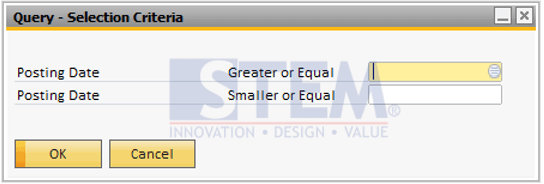
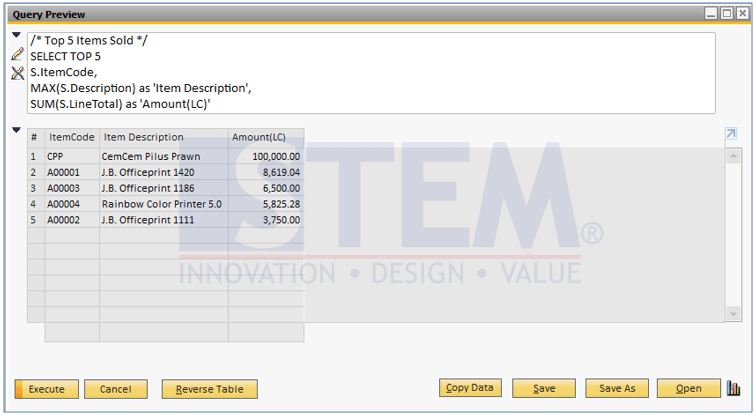
And when we click the “OK” button, SAP Business One will execute the query and show the result as below :
Also read relevant SAP Business One Tips:
- Custom SAP B1 Report: PR vs PO vs GRPO Comparison
- Add Print Time to SAP B1 Crystal Report Layout Easily
- Locking Report Design in SAP Crystal Reports
- Unlimited Multi-Level BOM Query in SAP B1 for HANA
- SAP B1 Equipment Card: Add Multiple Business Partners
- Sales Order Approval Query for Overdue A/R Invoices