In the business world, Opportunities play an important role in managing and tracking sales and purchasing activities before reaching a formal agreement. Although Opportunities do not generate journal entries and do not affect inventory or financial reports, all the data stored in them is highly valuable. This information helps companies understand the negotiation process, monitor potential transactions, and maintain good relationships with customers and suppliers.
Due to its strategic nature, deleting Opportunities without proper consideration can result in significant information loss. Historical data such as negotiation stages, estimated transaction values, communication activities, and reasons for deal failures may be lost. In fact, this information is often essential for evaluation and learning within the sales or purchasing team.
To minimize this risk, SAP B1 introduces a special authorization that defines who is allowed to remove Opportunities. With this control in place, deletion can only be performed when truly necessary and by users with the appropriate authorization.
The setup process is simple:
- Go to Administration > System Initialization > Authorizations > General Authorizations.
- Select the user whose access rights you want to configure.
- Expand the Opportunities – Special Opportunity Authorizations section, choose Remove Opportunity, and define the authorization level (No Authorization, Read Only, or Full Authorization).
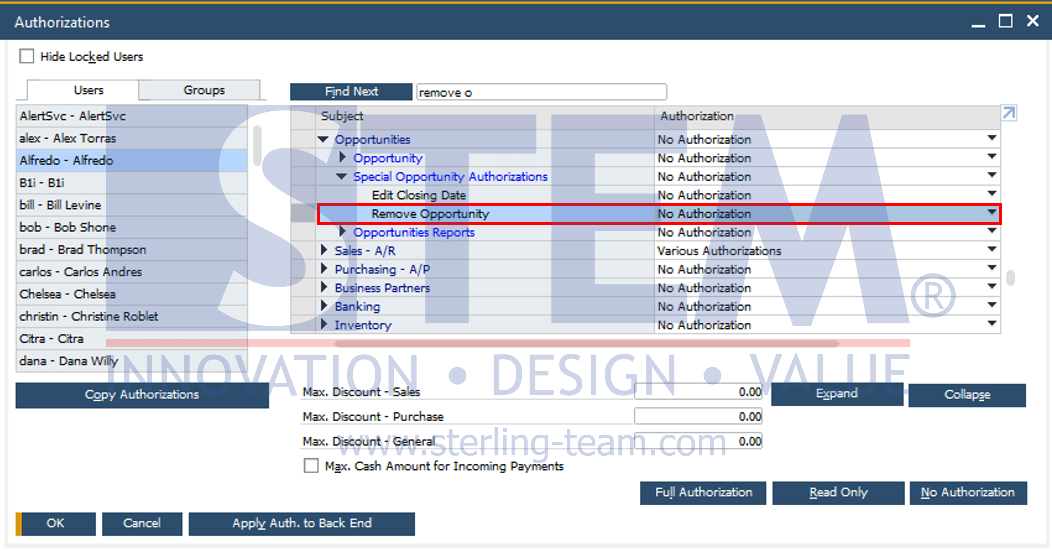
By default, the authorization to remove Opportunities is set to Full Authorization. However, users can adjust this setting according to company policies to ensure data security.
With this configuration, companies not only protect valuable data from accidental deletion but also ensure that evaluation and learning processes from every Opportunity can continue to be leveraged optimally.