
There are many options to upload data to SAP Business One, you can use Copy Table feature, use Data Transfer Workbench, and also use Microsoft Excel.
It will be easier if you using Microsoft Excel, that because you must be already have a prepared data on excel format (.XLS or .XLSX), right? You don’t need to make another format for upload process to SAP Business One.
This is how to do:
- Make sure that your data on all column already sorted correctly
- You can’t use any header, so delete it first.
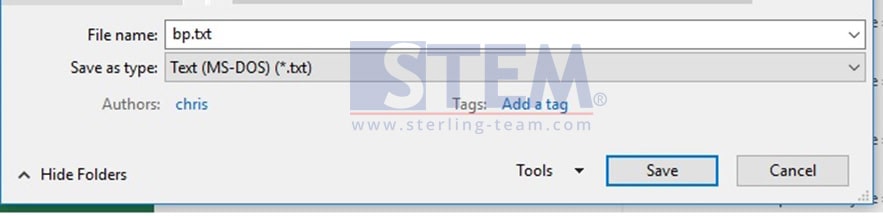
- That will be better if your excel format is .TXT (text file)
- Then, logon to SAP Business One
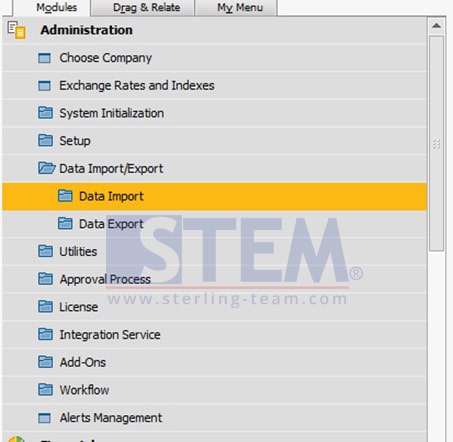
- Choose menu Administration > Data Import/Export
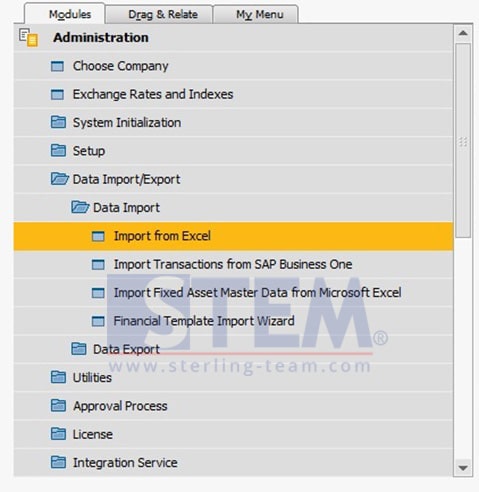
- Choose Data Import > Import from Excel
- On Import from Excel window, choose Data Type to Import: Business Partner
Select your file from browse button.
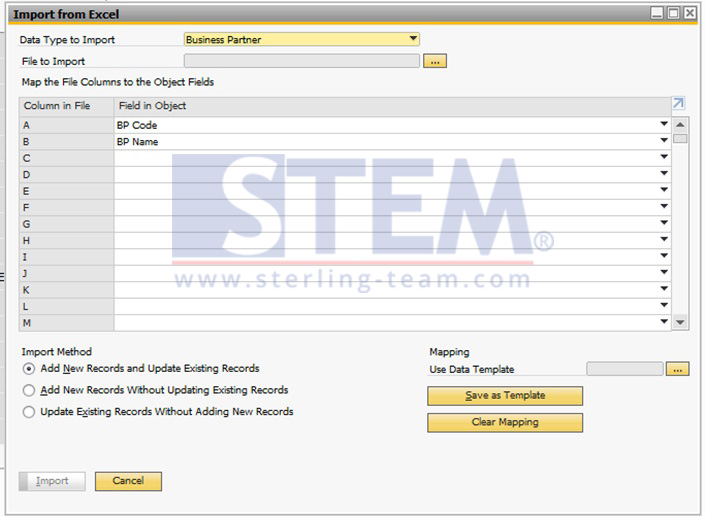
- Choose and match your column position from your file with column in object
Example:
On your .xls file, you have 2 columns, Column A filled with BP Code, and Column B filled with BP Name. - Choose your Import Method, you can choose base on your own preference, commonly, a lot of people use “Add New Records and Update Existing Records“.
Also read relevant SAP Business One Tips:
- Enable Address ID Updates for Business Partner in SAP B1
- The Role of Lead Time in MRP Calculation in SAP Business One
- Add Print Time to SAP B1 Crystal Report Layout Easily
- Change Date Separator in SAP Business One Guide
- Master Your Warehouse Locations Setup in SAP Business One
- Enable Multiple Scheduling for SAP B1 Service Calls