When we open SAP Business One Studio, sometimes we get error message “Error in XML Document (0,0)” that caused by root element is missing. This will cause SAP Business One Studio cannot open and run the XML file and you cannot use SAP Business One Studio.
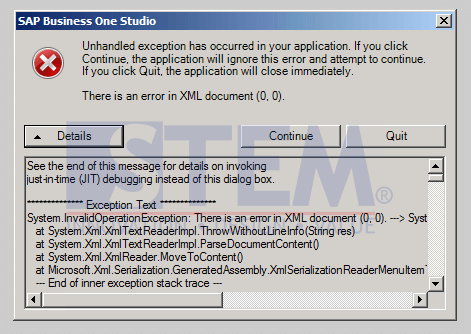
SAP Business One Tips – How To Troubleshoot problem ‘Error in XML Document (0,0)’ at SAP Business One Studio
One simple way to solve the problem is to delete a folder called ‘Business One Studio’ located inside “C:Users[User]SAP“.
- Enter the ‘C:Users[User]SAP’ folder, This folder contain corrupted XML file that cause ‘error XML in document (0,0)’.
- Delete the “Business One Studio” folder.
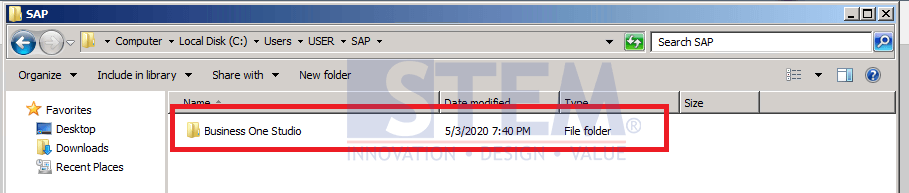
SAP Business One Tips – How To Troubleshoot problem ‘Error in XML Document (0,0)’ at SAP Business One Studio
- After we delete the folder, run SAP Business One Studio again, and it will automatically create a new ‘Business One Studio’ folder, together with the new XML file.
Also read relevant SAP Business One Tips:
- How to Fix Error Updating Document Numbering in SAP B1
- Fix Error When Previewing or Printing Crystal Report
- Fix Table Not Found Error in SAP Business One
- Fix DTW Upload Error Caused by Special Characters
- Fix Invalid Currency Error in SAP Business One Journal Entry
- Fix Division by Zero Error in Crystal Reports