To change the Control Account on SAP Business One, there are a number of things to consider: Ensure that there are no outstanding transactions (AR Invoice, AP Invoice, AR Credit Memo, AP Credit Memo, etc.). But if there are transactions that are still outstanding, then it should be noted as follows:
- The outstanding balance must be taken and transferred to the new control account
- Pay attention to the balance per month, because if there is an incoming payment / outgoing payment for those that are still outstanding, then the journal will still go into the old control account even if the control account has been improved. The documents are usually Incoming payments, outgoing payments, Cancelation documents
- Look for the number that still goes to the old control account, then move the balance from the old control account to the new control account
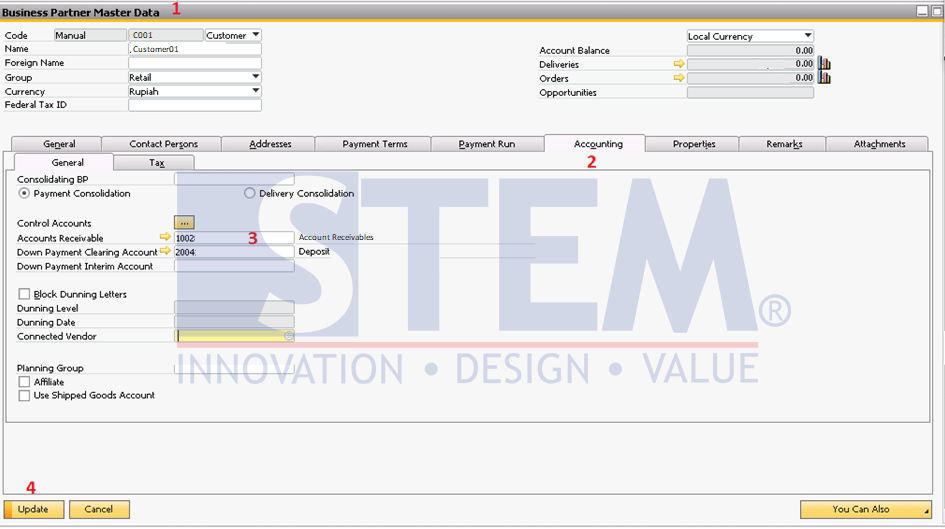
Step for change control account in number base on the picture above :
- Open BP Master Data Menu.
- Click Accounting Tab.
- Change the control account to the right one.
- Then click the update button.
SAP Business One Tips – How to Change Control Account
Also read relevant SAP Business One Tips:
- How to Depreciate Assets in SAP Business One – Quick Guide
- How to Cancel Manual Reconciliation in SAP Business One
- Change CPL Display by Toggling Display Description SAP B1
- How to Set SAP Business One Control Account – Guide
- A/R Credit Memo for Returned Items in SAP B1
- Credit Memo from Closed AR Invoice | SAP B1 Tip