
Do you know that you can remove Business Partner Master Data in SAP Business One? Yes, you can. But there are several conditions if you want to delete Business Partner Master Data.
Here are the conditions:
- Business Partner balance is zero.
- Business Partner is not defined as a consolidation business partner.
- Business Partner is not connected to any document.
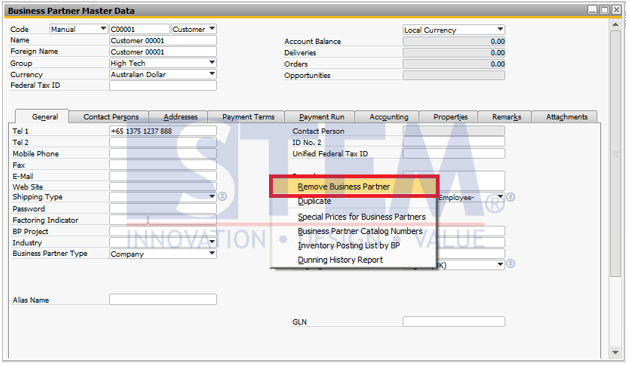
If all the conditions met, you can remove the Business Partner Master Data by finding the Business Partner Master Data then Right Click on the Business Partner Master Data window > Remove Business Partner
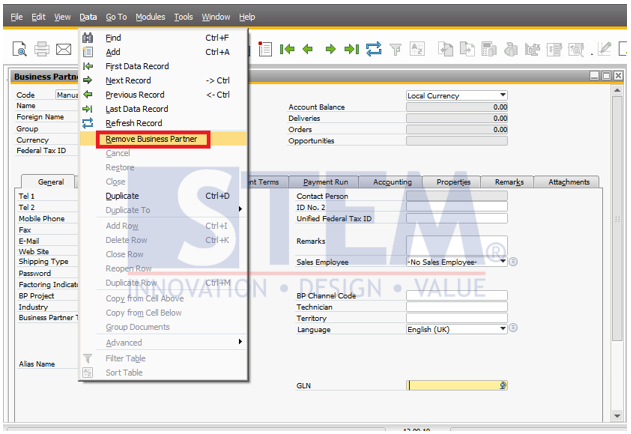
or from the menu bar choose Data > Remove Business Partner
Also read relevant SAP Business One Tips:
- How to Set Up Shipping Methods in SAP Business One
- Optimize Business Partner Channels in SAP B1
- How to Set Default Warehouse in SAP B1 (Part 2)
- How to Deactivate a Warehouse in SAP Business One
- SAP B1 Delete Draft Error: Approval Process Restriction
- Enable Address ID Updates for Business Partner in SAP B1