




With SAP Business One, you can easily Copy data from SAP to your Excel file with ‘Copy Table’ Function without using ‘Export’ Function.
Here’s how to use the function:
- Open SAP document or Report that you want to copy
- Right Click on ‘#’ and then Choose ‘Copy Table’
- Open Excel Document, Right Click and then Choose ‘Paste’
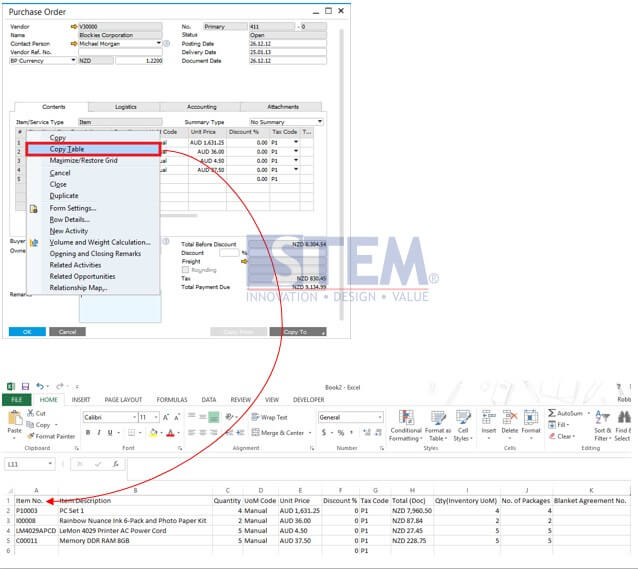
Note: This is applicable in SAP Business One version 9.1 and above
copyright © PT Sterling Tulus Cemerlang – 2016
SAP Partner Indonesia / SAP Business One
SAP Partner Indonesia / SAP Business One
Also read relevant SAP Business One Tips:
- Disable Auto‑Open for Excel Exports in SAP Business One
- Export & Import Crystal Reports in SAP Business One
- Export Crystal Reports Layouts in SAP Business One
- Easily Set Default Layout in SAP Business One
- How to Copy Attachment Documents in SAP Business One
- SAP B1 Delete Draft Error: Approval Process Restriction









