When we’re on the end of period, User on SAP can change the period status to “Closing Period”, so another users cannot make any transactions in the previous period. It becomes an easy job if one period consists of 1 year, but it will be a new challenge if you set for one period is only consists of 1 month or 1 week, this is a very important job, and not as easy as heared. For that, we have a solution for you, SAP B1 can change period status automatically, you don’t need to updated one by one.
Before discussing how to automate the “Closing Period” feature in SAP Business One, it’s better to read the previous article regarding Posting Periods on this article Closing Period from Any Transaction
Next, this automatic feature can be set from Posting Periods menu from Administration – System Initialization.
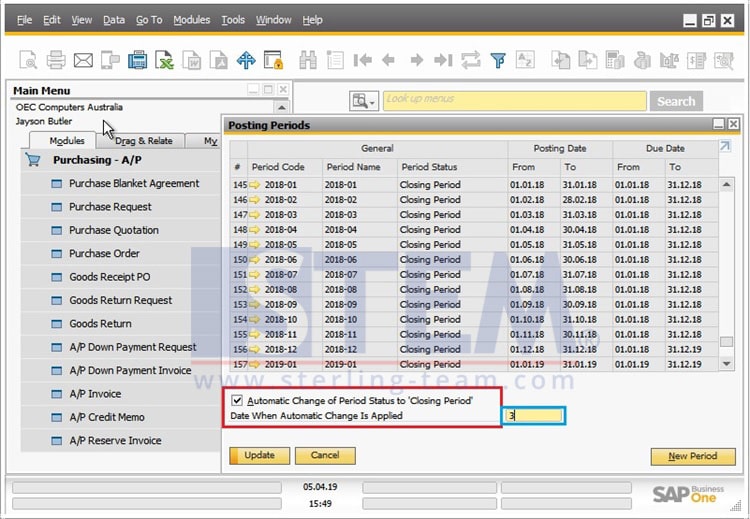
If the user tick the checkbox, the status period will automatically change to “Closing Period” according to the date specified, and the user can change the date on which the status change occurs, for example selecting “3” so the user can still make transactions for 3 days after the new period active as current period.
Also read relevant SAP Business One Tips:
- Fix “G/L Account Needs DR Assignment” Error in SAP B1
- Fix Recurring Posting Failed to Create Journal Entry
- Set Up New Posting Period in SAP Business One
- View Other Users’ Payment Draft in SAP B1 Report
- How to Cancel Manual Reconciliation in SAP Business One
- Use Multiple Currencies in SAP B1 Header & Rows