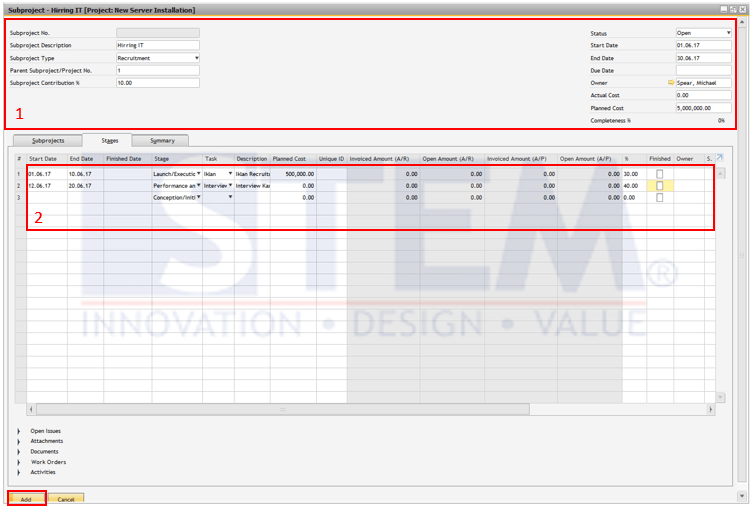
In managing a large project, sometimes you need to decide to divide your project into several sub-projects with the aim of reducing complexity during implementation or to share it with several Project Managers.
In SAP Business One Project Management, you can do this by going to the Sub Project tab from your Project screen. You need to tick the “Project with Sub Project” check box first, after you have tick it, the subproject tab will appear.
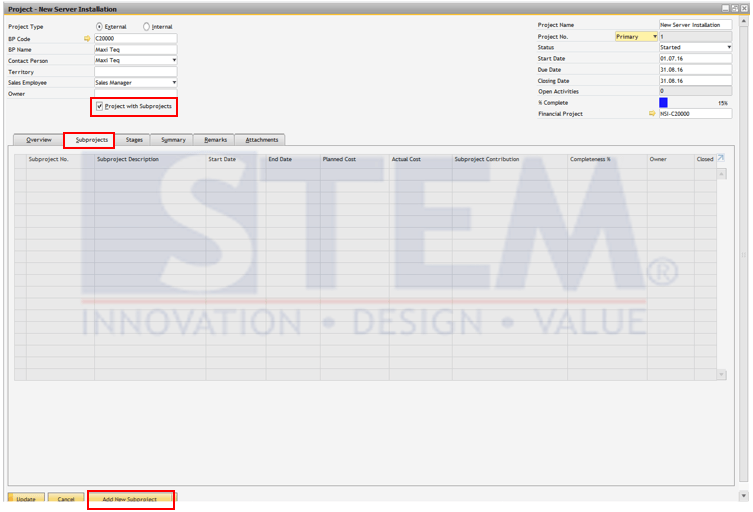
Procedure:
- On the Subprojects tab, choose the Add New Subproject option to open a Subproject window. Ensure the form is in add mode. The Subproject window is similar to the Project window. It shows similar information in the header area and contains the Subprojects, Stages, and Summary tabs, which you define in the same way as the tabs in the main Project window. A subproject is treated as a sublevel project. One project can contain several subprojects, each of which can contain subprojects as well.
- Define the information about the subproject and choose Add