Have you ever made a Document Drafts in SAP Business One? You can see all the Document Drafts that you created in the Document Drafts Report. In the Document Drafts Report, you can see all the Document Drafts that haven’t been confirmed. But what if you create a wrong Document Drafts? Don’t worry, you can remove the Document Drafts that you created.
First, you must go to Document Drafts Report
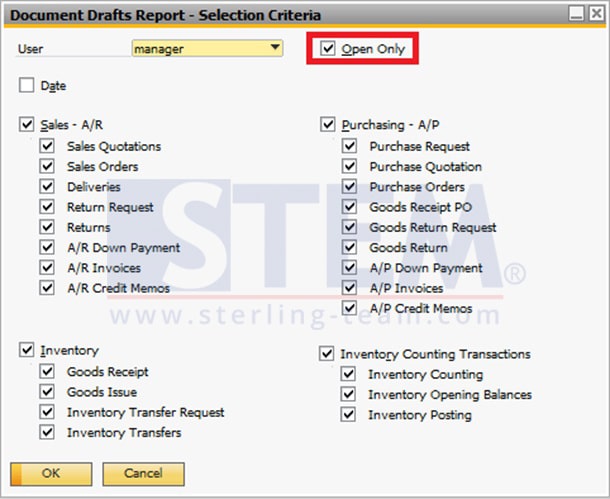
Select Open Only if you want to only displays the drafts that have not been added yet as a real document in SAP Business One. And if you do not select that, it will display all the draft documents that have been created including those that are still pending. Before you click OK make sure to select all the criteria you want to display and un-select the criteria you do not want to display.
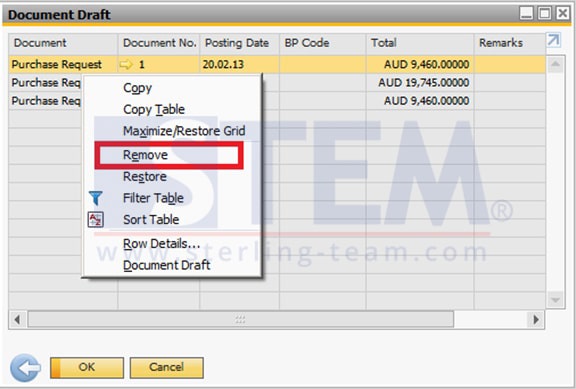
A list of the Document Drafts will appear. Right Click on the document that you want to remove and click Remove.
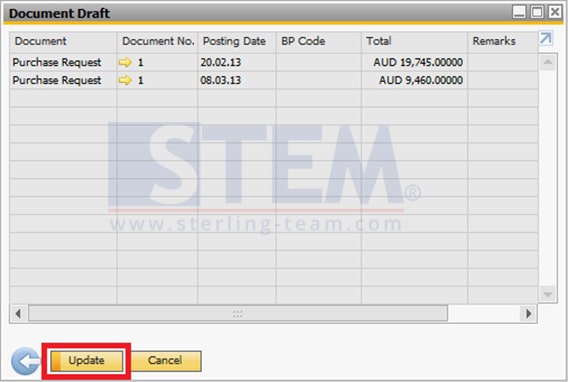
If you already done and want to save the changes, click Update. Otherwise, click Cancel.
Also read relevant SAP Business One Tips:
- SAP B1 Delete Draft Error: Approval Process Restriction
- How to Show Draft No. Column in Document Drafts Report
- Custom SAP B1 Queries with Golden Arrows Guide
- Limit Document Cancellation by Age in SAP Business One
- Auto Update Price in Recurring Transactions SAP B1
- How to Set Default Warehouse in SAP Business One – Part 1