• Ctrl +B Shortcut: Copy “Balance Due” to “Total” in SAP B1

    Ctrl +B Shortcut: Copy “Balance Due” to “Total” in SAP B1

    January 27, 2017

    Ctrl +B Shortcut: Copy “Balance Due” to “Total” in SAP B1

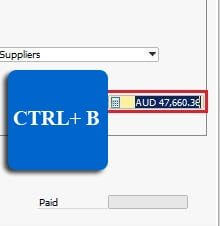
    Save your time! You can copy the balance due amount in payment means windows to field Total by clicking “CTRL+B”  in SAP Business One Sub Menu Payment Means (Module Outgoing Payment and Incoming Payment). So you won’t miss value again

    Read more ›

  • Past-Date Aging Report for Receivables & Payables in SAP Business One

    Past-Date Aging Report for Receivables & Payables in SAP Business One

    January 17, 2017

    Past-Date Aging Report for Receivables & Payables in SAP Business One

    In SAP Business One, sometime you want to checking value GL Account Receivable (Financial – Chart Of Account) and Customer Receivable Aging (Business Partners – Business Partners Reports – Aging – Customer Receivable Aging) with past period or past month.

    Read more ›

  • Hide Confirmation Of Recurring Windows

    Hide Recurring Window Confirmation in SAP Business One

    December 8, 2016

    Hide Recurring Window Confirmation in SAP Business One

    Confirmation of Recurring Windows may not important for some user, however this window show up when the user login to SAP Business One. We can hide this windows by change the setting in the General Setting module. After we change

    Read more ›

    Tagged with:
  • How to Define your Financial Key Performance Indicator (KPI) Factor in SAP Business One - SAP Business One Tips

    Define Financial KPI Factors in SAP Business One

    November 19, 2016

    Define Financial KPI Factors in SAP Business One

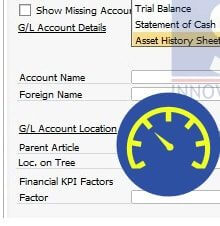
    With SAP Business One you can define your Financial Key Performance Indicator (KPI) Factor. After defining the KPI, you can put this on Pervasive Analytic Designer and add the KPI on your widget (in Hana version) Also read relevant SAP

    Read more ›

  • How to Maximize & Restore Grid in SAP B1 Reports

    How to Maximize & Restore Grid in SAP B1 Reports

    October 19, 2016

    How to Maximize & Restore Grid in SAP B1 Reports

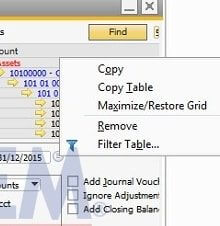
    You can maximize screen to choose multiple GL account with tick mark in SAP Report Trial Balance and General Ledger, or another SAP Business One Financial Report that have tick mark GL Account matrix. It is quite helpful because you

    Read more ›

  • Separate Journal Entry per Line in SAP B1 – Tip

    Separate Journal Entry per Line in SAP B1 – Tip

    October 17, 2016

    Separate Journal Entry per Line in SAP B1 – Tip

    In SAP Business One, Journal entry created from document transaction posting can be setting as your needs: Split in a journal entry previews only Split No Split So if you need to analyse the amount per lines, then you can

    Read more ›

  • Set Budget for Multiple Cost Centers in SAP B1

    Set Budget for Multiple Cost Centers in SAP B1

    September 26, 2016

    Set Budget for Multiple Cost Centers in SAP B1

    If your company is applying ‘Budget’ for operational activities, you can easily create and monitor it with SAP Business One. You can have Budget per cost center by defining it on your budget scenario. From the SAP Business One Main Menu,

    Read more ›

  • Create Your Own SAP B1 Financial Report Template

    Create Your Own SAP B1 Financial Report Template

    July 29, 2016

    Create Your Own SAP B1 Financial Report Template

    Did you know that with SAP Business One you can create your own financial statement template using menu ‘Financial Report Template’ Also read relevant SAP Business One Tips:

  • Analyze Financial Reports Before & After Audit (SAP B1)

    Analyze Financial Reports Before & After Audit (SAP B1)

    July 21, 2016

    Analyze Financial Reports Before & After Audit (SAP B1)

    Commonly accounting user need to analyze their financial report before and after audit adjustment. With SAP Business One, if you have an audit adjustment, you can differentiate the adjustment by clicking the tick box Adj. Trans (period 13) while creating

    Read more ›

  • Rename Chart Of Account Drawer

    Rename Chart Of Account Drawer

    July 20, 2016

    Rename Chart Of Account Drawer

    In SAP Business One, we can rename Chart of Account Drawer as per user needs by typing in field name then click update Such as: drawer named ‘Taxation and Extraordinary Items’ → rename →  ‘CORPORATE TAXATION’ Note: this is applicable start from

    Read more ›

    Tagged with:
  • Block Manual Posting in SAP Business One – Guide

    Block Manual Posting in SAP Business One – Guide

    Block Manual Posting in SAP Business One – Guide

    In SAP Business One, we can block a GL Account from manual posting by ticking Block Manual Posting check box in menu Chart of Account   copyright © PT Sterling Tulus Cemerlang – 2016 SAP Partner Indonesia / SAP Business

    Read more ›

  • SAP B1 Chart of Account 9.2-10: Up to 10 Levels

    SAP B1 Chart of Account 9.2-10: Up to 10 Levels

    SAP B1 Chart of Account 9.2-10: Up to 10 Levels

    Now in SAP Business One, we can have chart of account up to 10 levels. Note: This is applicable in SAP Business One Version 9.2 and above copyright © PT Sterling Tulus Cemerlang – 2016 SAP Partner Indonesia / SAP

    Read more ›

  • SAP B1 Document Relationship Map Guide

    SAP B1 Document Relationship Map Guide

    July 18, 2016

    SAP B1 Document Relationship Map Guide

    Another helpful feature from SAP Business One is  “Relationship Map”. This feature allows you to see what other document related to your document, or how far your document has been processed. To use this feature, right click on an open

    Read more ›