
Ketika anda meninjau Crystal Report Layouts atau Report Anda dapat mengekspor Crystal Reports Layouts atau Reports ke komputer Anda sebagai salah satu dari jenis file berikut ini:
- Crystal Reports (*.rpt)
- PDF (*.pdf)
- Microsoft Excel [97-2003] (.xls)
- Microsoft Excel [97-2003] Data-Only (.xls)
- Microsoft Word [97-2003] (.doc)
- Microsoft Word [97-2003] – Editable (.rtf)
- Rich Text Format (RTF) (*.rtf)
- XML (*.xml)

Prosedur untuk mengekpor layout atau report:
- Pada Crystal Reports Viewer pada toolbar, klik tombol
 Export Report.
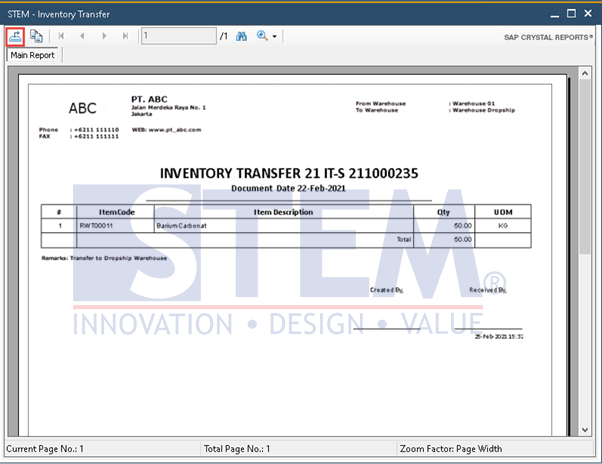
SAP Business One Tips – Export Crystal Reports Layouts in SAP Business One
- Pada jendela Export Report, navigasikan ke folder yang ada pada komputer anda, dimana anda ingin menyimpan laporan.
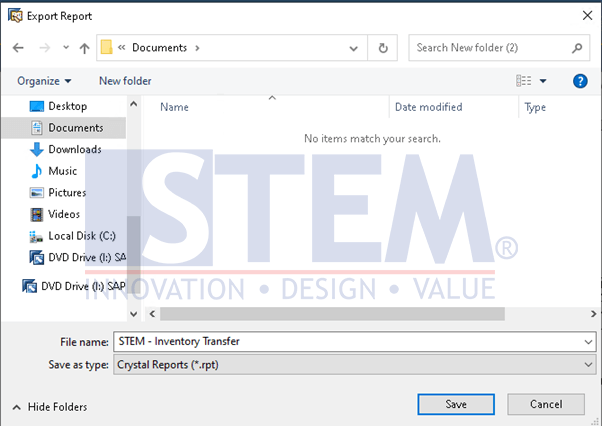
SAP Business One Tips – Export Crystal Reports Layouts in SAP Business One
- pada field File name, masukan nama untuk file yang diekspor
- Pada Save as type, pilih tipe file.
- Tekan tombol Save.
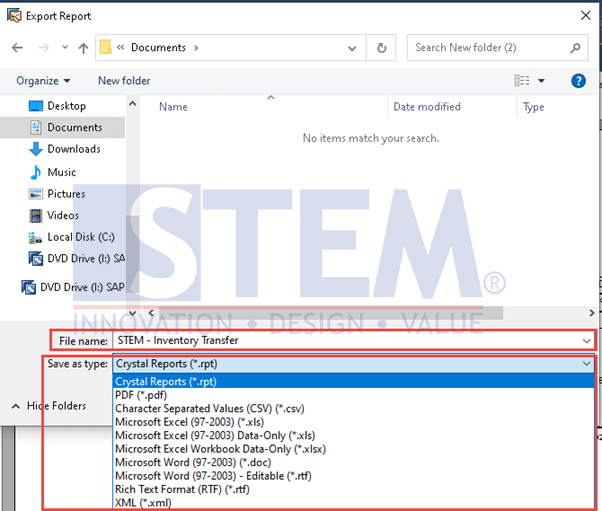
SAP Business One Tips – Export Crystal Reports Layouts in SAP Business One
- Crystal Reports Layouts atau Reports telah diekspor.
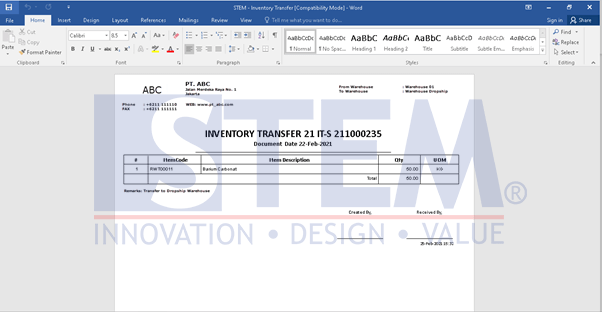
SAP Business One Tips – Export Crystal Reports Layouts in SAP Business One
Baca juga Tips SAP Business One yang relevan:
Originally posted 2025-05-28 19:35:35.