There are times when there are some items that should not be placed in a particular warehouse, and in SAP there are functions that can help with these conditions.
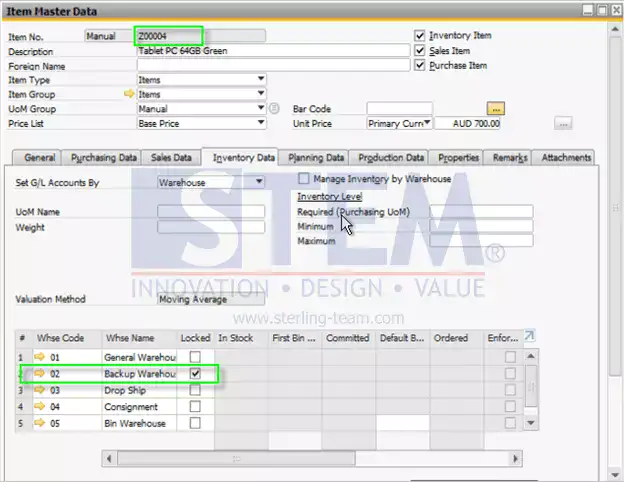
In the item master data there is a list of active warehouses for the company used, and there is a “Locked” column in the warehouse list. If in a certain warehouse, the “Locked” column is a tick on, then the item cannot be transacted on the checked warehouse.
SAP Business One Tips – Locked function in Item Master Data warehouse list
From the picture above, it means that item code Z00004 should not be placed in warehouse 02.
And if a transaction is made on that item with a restricted warehouse, the message “The warehouse is locked for this item” will appear. For example, attached:
- Purchase Order
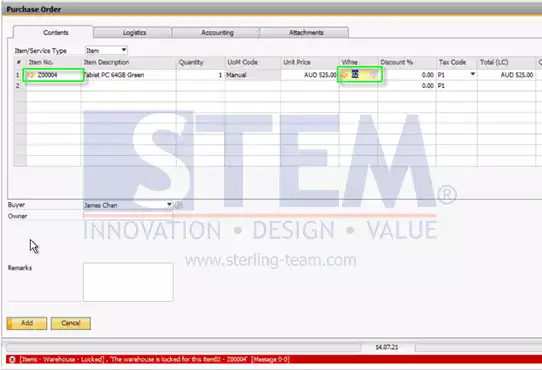
SAP Business One Tips – Locked function in Item Master Data warehouse list
- Good receipt
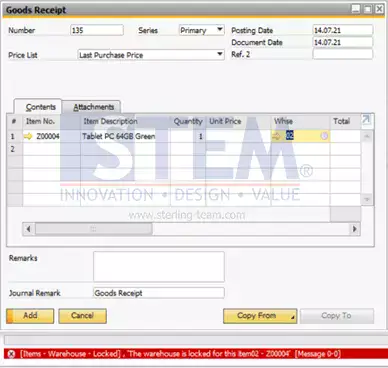
SAP Business One Tips – Locked function in Item Master Data warehouse list
Also read relevant SAP Business One Tips:
- Change CPL Display by Toggling Display Description SAP B1
- SAP B1 Open Item List Sort Not Showing – Fix Guide
- Enhanced BOM Description Update in SAP Business One v10
- How to Check Item Stock Availability in SAP Business One
- Re-activate Items in SAP Business One – Step-by-Step
- Find Unavailable Items in SAP Business One