In SAP Business One, it allows you to use the customer reference number once for the same document. This can be used to reduce duplication when the user inputs documents.
To enable duplication block Cust. Reference No., follow these steps:
- On the main menu of SAP Business One, select Administration > System Initialization > Document Settings.
- The Document Settings window will appear. Then select the Per Document tab.
- Select the document to set (Cont.: Sales Quotation).
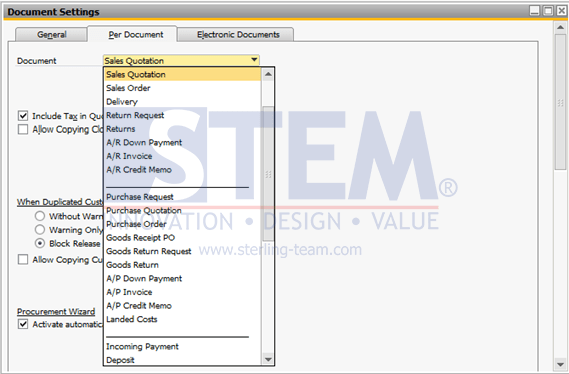
SAP Business One Tips – Block Duplicate Cust. Reference No.
- In the When Duplicated Cust. Reference No. Occurs field, When it occurs, select Block Release/Receipt.
- Press Update button.
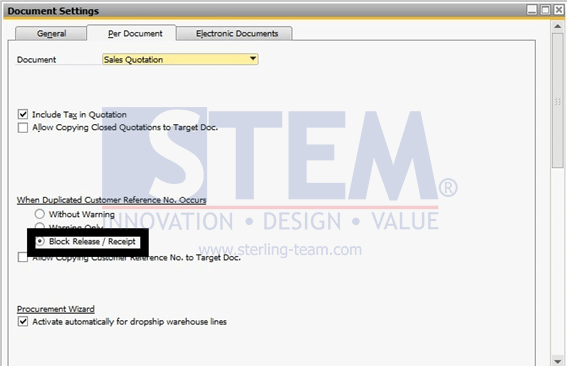
SAP Business One Tips – Block Duplicate Cust. Reference No.
- Make transactions with the same Cust. Reference No. as the previously created document.
- When pressing the Add button, an error message will appear as shown below:
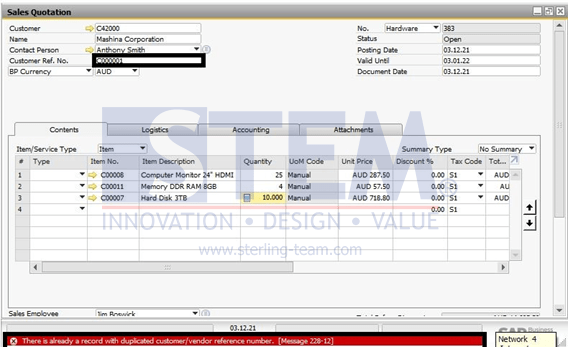
SAP Business One Tips – Block Duplicate Cust. Reference No.
Also read relevant SAP Business One Tips:
- How to Set Authorization for Duplicating Documents in SAP Business One
- How to Deactivate Approval Template in SAP Business One
- Allow Journal Entry Update in Locked Posting Period
- Landed Cost vs In-Stock Qty: Causes & Fixes
- How to Print SAP Business One Documents Automatically
- Auto-Remove Base Document Numbers in SAP Business One