If you’re using the Project Management module in SAP Business One, you’ll be familiar with a column called “Stage Dependence”. But, do you know what is it and how to use it?
Stage Dependence column used to define if finishing the stage is dependent on finishing one or more other stages. If a stage is dependent on another stage, it means that you cannot finish the stage until the stage it is dependent on is finished.
Here is an example:
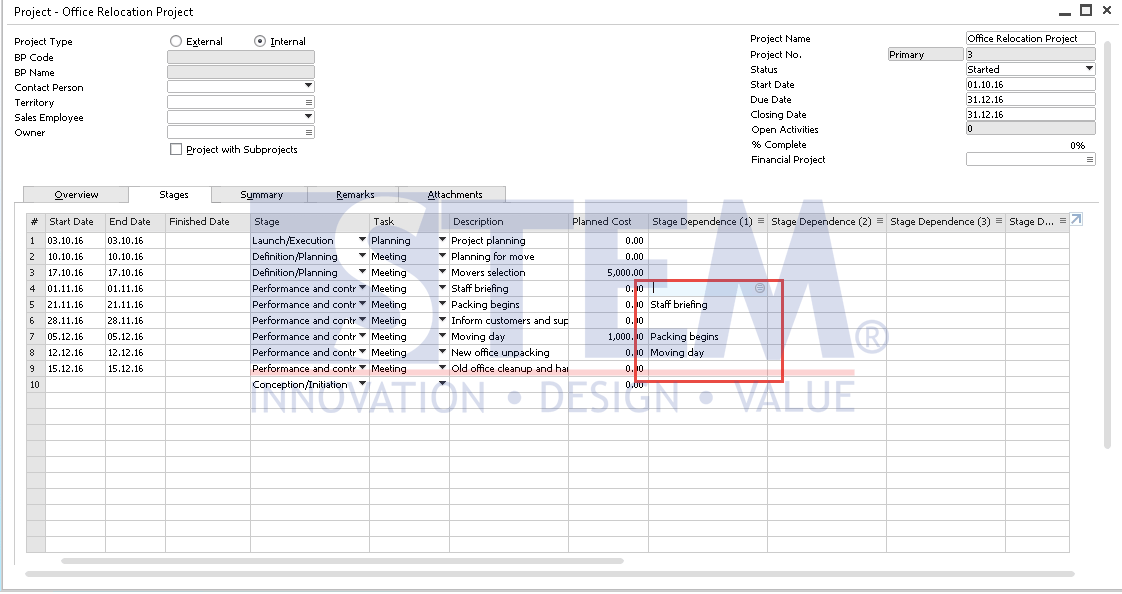
SAP Business One Tips – Stage Dependence on Project Management
As you can see from the example above, the Stage No 5 Is depends on Stage No 4. This means that the status of the stage no 5 can only be updated to “Finished” if stage predecessor or in the example is a stage no 4 is already finished.
If you update the stage no 5 when the stage no 4 is not finished, there will be an error message like this:

SAP Business One Tips – Stage Dependence on Project Management
Note: You can also add up to 4 Stage Dependence.
Also read relevant SAP Business One Tips:
- How to Hide Unused Layout in SAP Business One Easily
- SAP Business One Service Call: Uses & How It Works
- How to Change Date Format in SAP Business One
- How to Auto-Generate Warehouse Sublevels in SAP Business One
- How to Create Cockpit Template in SAP B1 HANA (Fiori)
- How to Find DocKey in SAP Crystal Reports